Event-app design concept film / Published on Dribbble
01 / Thea AI
The problem
- Reluctance to use complex dashboard apps for small tasks.
- A lack of automation for repetitive work.
- Heavy reliance on web-based interactions.
- A need for AI-driven bulk actions and insights.
Reading the problem / Thea AI
A focused assistant needs an inspectable action.
Ticketing managers move between devices and small operational tasks. An assistant response needs context and a clear boundary before execution.
An MVP across iPhone, iPad and Mac needs clear action scope and familiar Apple interaction patterns.
How can an AI assistant support small ticketing tasks without opening a dense web dashboard?
Evidence: the project account and the attributed artifacts on this page. Process drawings and interaction studies are reconstructed explanations; numerical research or business results are included only where separately supported.
02 / Thea AI
My role
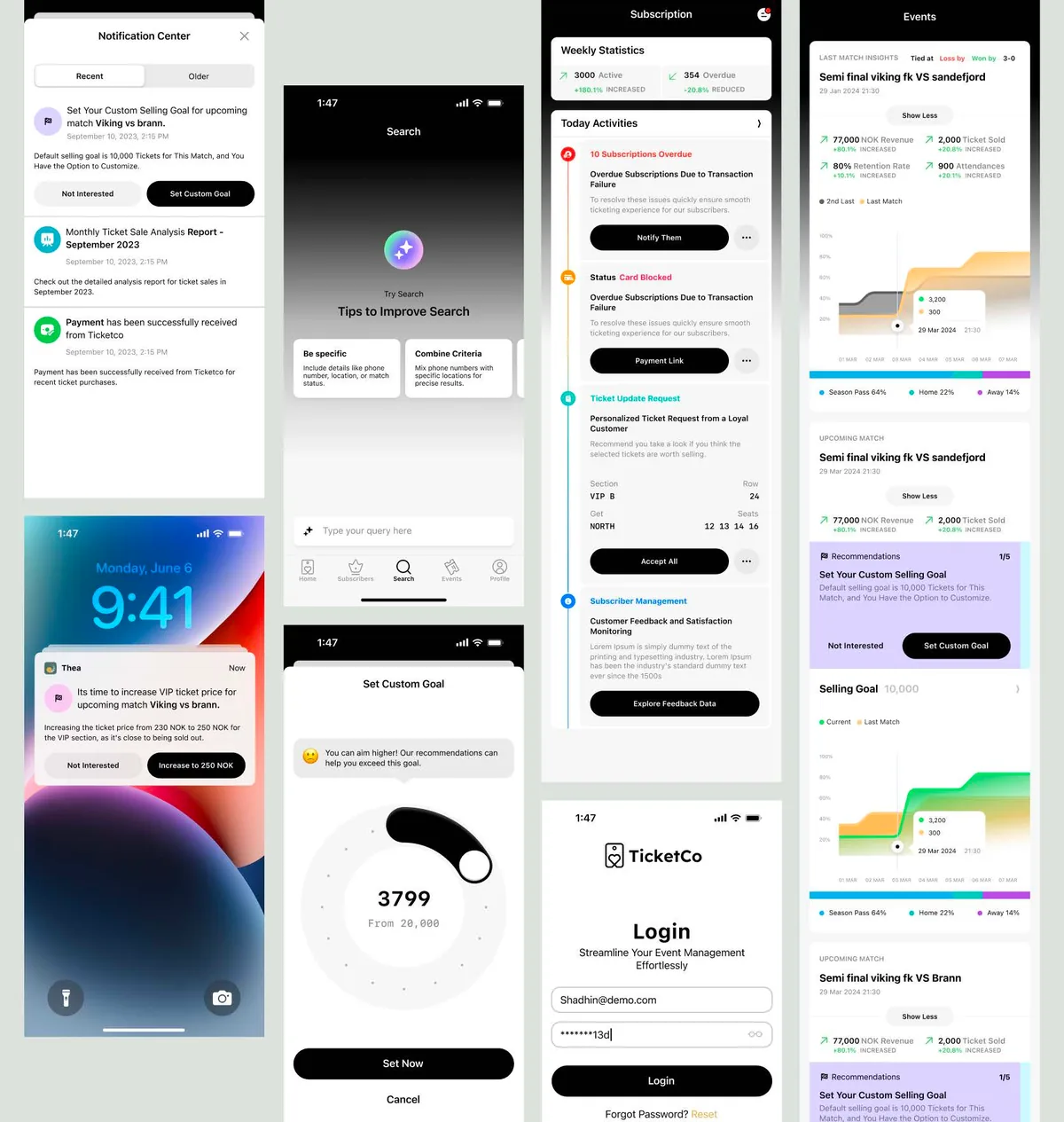
- Designed a focused, universal Apple-platform experience.
- Shaped AI-driven bulk actions and insight surfaces.
- Applied Apple Human Interface Guidelines throughout.
03 / Thea AI
The process
- Framed the MVP around high-friction manager tasks.
- Prototyped AI assistance and automation flows.
The process / Thea AI
A direction.
A way to build it.
The MVP process focuses on a small manager task and makes the assistant’s proposed action inspectable.
A schematic of sequence and overlap, not a dated project schedule.
Select the manager task
Frame the MVP around work that is awkward to complete through a dense web dashboard.
Define the action boundary
Separate request, suggestion, confirmation and result so assistance does not obscure what changes.
Explore Apple interactions
Prototype the assistant around familiar iPhone, iPad and Mac interface conventions.
Review the unresolved request
Check how the interface explains ambiguity or an action that cannot yet be completed.
How can an AI assistant support small ticketing tasks without opening a dense web dashboard?
Thea’s MVP frames assistance around manager intent. A request becomes a suggestion, then an explicit decision and an inspectable result. That sequence makes the difference between helping someone act and leaving them uncertain about what an AI response changed.
Journey map / Thea AI
See the whole task in context.
Choose a step to connect the person’s intent with the interface and the design decision.
Current intent
State a manager task
An MVP across iPhone, iPad and Mac needs clear action scope and familiar Apple interaction patterns.
- Interface context
- Task request
- Review question
- Which actions need explicit confirmation before changing event data?
Representative task sequence and recovery path, not a measured emotional curve or historical research map.
Behind the experience
The visible task depends on work behind it.
For Thea AI, this map connects “State a manager task” to “Inspect the result”. Read across to follow the task, then select a layer to inspect the interface, design and delivery references behind it.
| Layer | State a manager task | Review the suggestion | Confirm the action | Inspect the result |
|---|---|---|---|---|
| The task | State a manager task | Review the suggestion | Confirm the action | Inspect the result |
| Visible interface | Task request | Task request | Suggested action | Result summary |
| Design checkpoint | An MVP across iPhone, iPad and Mac needs clear action scope and familiar Apple interaction patterns. | Capture the manager’s immediate task. | Show the proposed action before it becomes a commitment. | Explain the result or why the request remains unresolved. |
| Implementation reference | Frame the MVP around work that is awkward to complete through a dense web dashboard. | Separate request, suggestion, confirmation and result so assistance does not obscure what changes. | Prototype the assistant around familiar iPhone, iPad and Mac interface conventions. | Check how the interface explains ambiguity or an action that cannot yet be completed. |
| Recovery | Ambiguous request → ask for clarification → revise the proposed action | |||
A reconstructed delivery map: the implementation row summarizes design-process dependencies, rather than claiming to document the original backend architecture.
Task-focused native surfaces.
Reconstructed comparison of design approaches. These are review studies, not a claim that both directions were historically tested or shipped.
What this direction changes
Task-focused native surfaces
Make the selected request, supporting information and confirmation easier to inspect.
Put the proposal between the request and the action.
The public record describes task framing and prototypes rather than a published wireframe archive. These studies distinguish the request surface, suggested action and result summary. Each has a different responsibility, particularly when a response is long or the request is incomplete.
01 / Task request
Thea AI⌕
01Task request↗
02Suggested action↗
03Result summary↗
Review the suggestion
Capture the manager’s immediate task.
02 / Suggested action
Thea AI⌕
State a manager taskTask request
Review the suggestionSuggested action ⌄
✓Confirm the action
Confirm the action
Show the proposed action before it becomes a commitment.
03 / Result summary
Thea AI⌕
Inspect the result
- Task request
- Review
- Suggested action
- Review
Inspect the result
Explain the result or why the request remains unresolved.
Try the interaction
Thea AI / Task & review study
Thea AI01 / 03
View 01
Task request
Capture the manager’s immediate task.
Keep this context visibleTask request
Capture the manager’s immediate task.
Starting context
State a manager task
Separate the manager’s words from the proposed action.
Give requests, assistant suggestions and confirmation actions distinct roles. Long generated responses must not push the critical decision out of view.
Illustrative type-role specimenThea AI
State a manager task.
Inspect the result.
HeadingSuggested action
24 / 30 px · regularBodyHow can an AI assistant support small ticketing tasks without opening a dense web dashboard?
16 / 26 px · regularLabelInspect the result
12 / 18 px · regularStateAmbiguous request → ask for clarification → revise the proposed action
12 / 18 px · regularPortfolio-font hierarchy illustration; the source does not establish the exact client font or token scale.
Define the boundary of the assistant’s authority.
Which actions need explicit confirmation before changing event data?
A confirmation view should expose the action’s scope. The important information is what will change, not simply that the assistant has produced a plausible answer.
What should the assistant explain when a request is incomplete or cannot be completed?
An incomplete request calls for clarification. Presenting that state clearly avoids making an unfulfilled intention look like a finished operation.
Specify assistance across Apple surfaces.
The interface work follows Apple HIG across iPhone, iPad and Mac. Handoff needs to preserve the meaning of a request, proposal and result while allowing each device enough room for its navigation and input conventions.
For a proposed Codex update, identify the assistant state being changed and the native reference it should follow. Review the visible action summary and ambiguity handling before treating the change as ready.
Thea is presented as a productivity MVP; this account does not establish a measured sales or support outcome.
Accessibility & standards
Access belongs in the design.
For Thea AI, carry accessibility requirements from the core user journey into component states, prototypes and engineering acceptance criteria.
WCAG 2.2 AA · EN 301 549 · APCA · WAI-ARIA · Platform guidance
Read and navigate with assistive technology
Specify accessible names, logical reading order and meaningful control roles. Plan VoiceOver or TalkBack checks, Dynamic Type or text scaling, and platform-appropriate touch targets.
Preserve meaning across themes
Review WCAG 2.2 AA contrast and non-color cues in light and dark appearances; use APCA as an additional typography-readability check.
Respect native behavior
Use Apple HIG and relevant Android guidance for navigation, gestures, focus and motion preferences. Give gesture-driven actions a discoverable alternative.
Review scope & standards references
These are design references and review priorities, not a claim that this historical project passed a WCAG audit. Record criterion-level evidence, assistive-technology and device results, unresolved issues and retest outcomes before making a conformance statement.
APCA supplements the WCAG 2.2 contrast checks; it does not replace them. WCAG 3 remains a draft. EN 301 549 v4.1.1 is the latest published edition checked on 6 November 2026; its publication and its formal EU legal citation are separate matters. Confirm the applicable procurement or legal baseline with the client.
Outcomes & scope
What the work delivers.
- Reduced dependence on web dashboards.
- Increased ticket sales and operational efficiency.
- Decreased reliance on customer support.
Results are described within the documented project scope. Illustrative studies are identified separately from original project artifacts.
Review & next iteration
What needs to hold up in use.
Use these questions to review Thea AI against the behavior the design is intended to support.
- 01
Can a manager identify what the assistant understood?
- 02
Is confirmation clear on iPhone, iPad and Mac?
Project-specific acceptance questions for a future review, not reported usability-test results.
Reflection / Thea AI
What I’d carry forward.
A small interface can still carry a consequential ticketing action. The useful constraint is to make context and confirmation clear without expanding every task into a full dashboard.