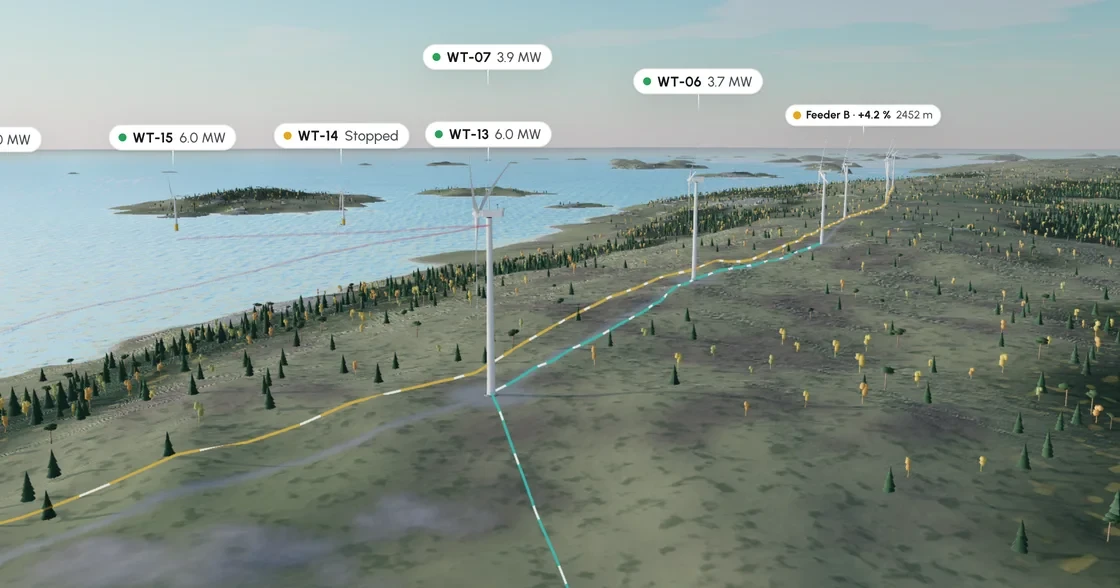
Original project visual
01 / Wind Farm
The challenge
Connect a geographic asset overview to detailed equipment inspection, including a cable-fault scenario that operators can understand visually.
Reading the problem / Wind Farm
The asset detail must remain tied to the site.
The wind-park twin connects turbines, cable diagnostics, asset detail and an AR presentation.
The coastal wind-park twin is an independent simulated 3D/AR prototype, distinct from client industrial work.
How can an interactive twin connect a spatial asset to actionable inspection information?
Evidence: the project account and the attributed artifacts on this page. Process drawings and interaction studies are reconstructed explanations; numerical research or business results are included only where separately supported.
02 / Wind Farm
The approach
A browser-rendered 3D scene links selected assets to typed inspection data and simulated diagnostic scenarios. A separate AR route provides the asset presentation experience.
03 / Wind Farm
My contribution
- Built the coastal park scene, turbine interactions and substation context.
- Connected cable-scan scenarios to asset inspection panels.
- Created phone-oriented AR presentation flows and reused suite controls for a coherent operations experience.
The process / Wind Farm
A direction.
A way to build it.
The digital-twin exploration carries asset identity from a park overview into diagnostics and AR presentation.
A schematic of sequence and overlap, not a dated project schedule.
Frame the inspection context
Identify the turbine or cable detail that gives an inspection a clear subject.
Separate overview and diagnosis
Decide which information benefits from spatial placement and which belongs in a panel.
Explore 3D and AR views
Prototype the connection between asset selection, detail and presentation mode.
Review missing information
Preserve the inspected asset when a reading or diagnostic detail is unavailable.
How can an interactive twin connect a spatial asset to actionable inspection information?
A turbine selected in the overview becomes a diagnostic subject with its own details. Keeping that identity intact through inspection and AR exploration helps the digital twin communicate more than the shape of a wind park.
Journey map / Wind Farm
See the whole task in context.
Choose a step to connect the person’s intent with the interface and the design decision.
Current intent
Select a turbine
The coastal wind-park twin is an independent simulated 3D/AR prototype, distinct from client industrial work.
- Interface context
- Wind-park overview
- Review question
- What should stay visible when moving from the park overview to one asset?
Representative task sequence and recovery path, not a measured emotional curve or historical research map.
Behind the experience
The visible task depends on work behind it.
For Wind Farm, this map connects “Select a turbine” to “Explore the AR view”. Read across to follow the task, then select a layer to inspect the interface, design and delivery references behind it.
| Layer | Select a turbine | Inspect diagnostics | Review asset detail | Explore the AR view |
|---|---|---|---|---|
| The task | Select a turbine | Inspect diagnostics | Review asset detail | Explore the AR view |
| Visible interface | Wind-park overview | Wind-park overview | Cable diagnostics | Asset & AR detail |
| Design checkpoint | The coastal wind-park twin is an independent simulated 3D/AR prototype, distinct from client industrial work. | Orient the inspection in the wider wind park. | Connect cable information to the selected asset. | Preserve identity while exploring the asset or AR presentation. |
| Implementation reference | Identify the turbine or cable detail that gives an inspection a clear subject. | Decide which information benefits from spatial placement and which belongs in a panel. | Prototype the connection between asset selection, detail and presentation mode. | Preserve the inspected asset when a reading or diagnostic detail is unavailable. |
| Recovery | Diagnostic detail unavailable → keep asset context → offer another inspection view | |||
A reconstructed delivery map: the implementation row summarizes design-process dependencies, rather than claiming to document the original backend architecture.
Move between site and selected asset.
Reconstructed comparison of design approaches. These are review studies, not a claim that both directions were historically tested or shipped.
What this direction changes
Move between site and selected asset
Preserves orientation while revealing the relevant diagnostic context.
Hold onto the asset as the view becomes more detailed.
The park overview, cable diagnostics and asset/AR detail studies explain changes in scale. Each view should retain enough context to answer what is being inspected and why the displayed reading belongs to it. The drawings interpret an independent simulation rather than client deployment work.
01 / Wind-park overview
0102Wind-park overview
Selected contextInspect diagnosticsOverview ↔ Detail
Inspect diagnostics
Orient the inspection in the wider wind park.
02 / Cable diagnostics
0102Cable diagnostics
Selected contextReview asset detailOverview ↔ Detail
Review asset detail
Connect cable information to the selected asset.
03 / Asset & AR detail
0102Asset & AR detail
Selected contextExplore the AR viewOverview ↔ Detail
Explore the AR view
Preserve identity while exploring the asset or AR presentation.
Try the interaction
Wind Farm / Selection & context study
Wind Farm01 / 03
View 01
Wind-park overview
Orient the inspection in the wider wind park.
Selected contextWind-park overview
Orient the inspection in the wider wind park.
Starting context
Select a turbine
Readings need labels, units and a clear asset relationship.
Make asset IDs, reading labels and units readable at multiple scales. Spatial annotations need a consistent relationship with the detail panel.
Illustrative type-role specimenWind Farm
Select a turbine.
Explore the AR view.
HeadingCable diagnostics
24 / 30 px · regularBodyHow can an interactive twin connect a spatial asset to actionable inspection information?
16 / 26 px · regularLabelExplore the AR view
12 / 18 px · regularStateDiagnostic detail unavailable → keep asset context → offer another inspection view
12 / 18 px · regularPortfolio-font hierarchy illustration; the source does not establish the exact client font or token scale.
Decide which details need spatial context.
What should stay visible when moving from the park overview to one asset?
Moving from a park to one asset should preserve a recognizable selection. Without that continuity, the detail panel can look authoritative while leaving its relationship to the scene unclear.
Which diagnostic details benefit from spatial context, and which need a conventional reading surface?
Spatial context helps explain location and relationships; a conventional panel better supports reading diagnostic detail. The two views need to reinforce the same inspection.
Connect selection, diagnostics and presentation modes.
The Three.js and AR prototype connects a coastal park with turbines and cable-diagnostic detail. Handoff references should show the asset selection and available information before describing the visual transition into another presentation mode.
For an agent-assisted addition, identify the asset and diagnostic state being represented. Test unavailable-detail behavior alongside the spatial view, and keep simulated readings visibly within the prototype’s scope.
The wind-park twin is an independent simulated 3D/AR demonstration, separate from industrial client product work.
Accessibility & standards
Access belongs in the design.
For these operational workflows, prioritize readable status data, non-color alerts, accessible approval controls and a 2D alternative to spatial inspection.
WCAG 2.2 AA · EN 301 549 · APCA · WAI-ARIA · Platform guidance
Make spatial information available in another form
Provide a meaningful 2D or text route to tasks and data presented in 3D. Review keyboard, pointer and assistive-technology access to the surrounding interface.
Reduce visual and physical demands
Plan readable labels, non-color status cues, stable interaction targets and alternatives to precision gestures. Respect reduced motion and avoid relying on camera movement to communicate state.
Separate usability from safety assurance
Use ISO 9241-210 human-centred design principles and relevant platform guidance alongside WCAG 2.2 AA and EN 301 549 review. Industrial usability work is not evidence of safety certification.
Review scope & standards references
These are design references and review priorities, not a claim that this historical project passed a WCAG audit. Record criterion-level evidence, assistive-technology and device results, unresolved issues and retest outcomes before making a conformance statement.
APCA supplements the WCAG 2.2 contrast checks; it does not replace them. WCAG 3 remains a draft. EN 301 549 v4.1.1 is the latest published edition checked on 6 November 2026; its publication and its formal EU legal citation are separate matters. Confirm the applicable procurement or legal baseline with the client.
Outcomes & scope
What the work delivers.
- Demonstration digital twin with simulated asset data. It is not a live SCADA system or a validated predictive-maintenance model.
Results are described within the documented project scope. Illustrative studies are identified separately from original project artifacts.
Review & next iteration
What needs to hold up in use.
Use these questions to review Wind Farm against the behavior the design is intended to support.
- 01
Can an operator locate the selected turbine from its detail?
- 02
Does changing the view preserve the relevant diagnostic context?
Project-specific acceptance questions for a future review, not reported usability-test results.
Reflection / Wind Farm
What I’d carry forward.
An inspection view needs to connect the whole site to the individual asset. Spatial context is valuable when it helps an operator locate and interpret the information they need.