Project scope and contribution described in this case study.
01 / Cefalo Marketing & Sales Automation
The challenge
Connect technical content and sales prospecting in a usable workflow, with clear transitions between content preparation, lead selection and CRM submission.
Reading the problem / Cefalo Marketing & Sales Automation
Generation is only one part of publication.
The prototype connects developer articles, carousel preparation, lead filtering and selected-lead submission to HubSpot.
This is a working prototype connecting developer articles, content generation, selected leads and HubSpot; it is not an unattended production sales system.
How can content creation and lead selection stay reviewable before CRM submission?
Evidence: the project account and the attributed artifacts on this page. Process drawings and interaction studies are reconstructed explanations; numerical research or business results are included only where separately supported.
02 / Cefalo Marketing & Sales Automation
The approach
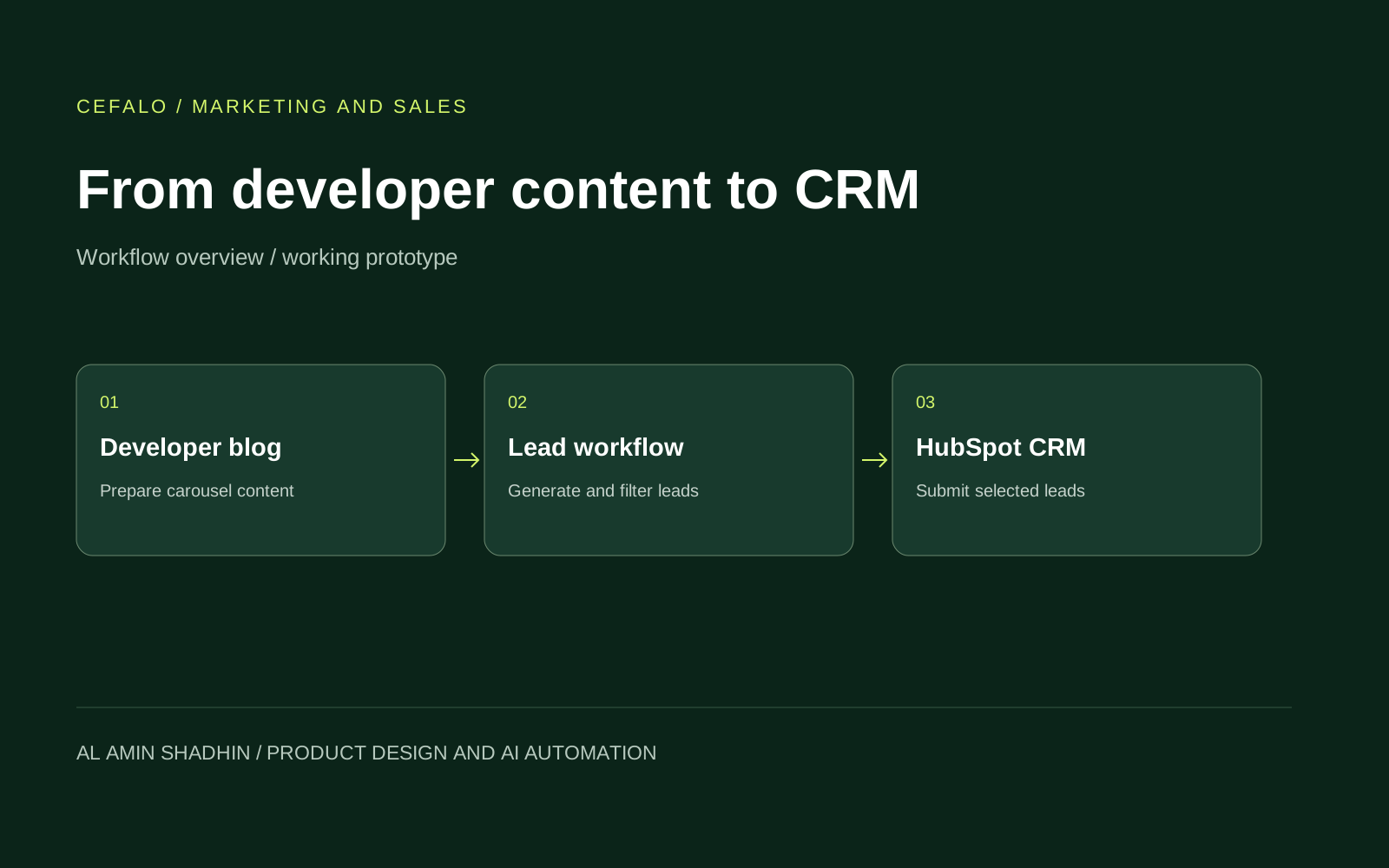
The prototype brings content preparation and lead handling into one workflow: transform developer posts into carousel content, generate and filter leads, then submit the selected leads to HubSpot CRM. The diagram is a workflow overview, rather than a screenshot of internal systems.
- Developer content. Start with a developer blog post.
- Carousel preparation. Transform the post into LinkedIn carousel content.
- Lead selection. Generate and filter potential leads.
- CRM handoff. Submit selected leads to HubSpot CRM.
03 / Cefalo Marketing & Sales Automation
My contribution
- Created a working prototype that converts developers’ blog posts into LinkedIn carousel content.
- Built lead-generation and filtering workflows, with selected leads submitted to HubSpot CRM.
- Combined workflow discovery, product/interface design and functional prototyping.
The process / Cefalo Marketing & Sales Automation
A direction.
A way to build it.
The prototype connects content preparation to CRM submission through explicit review boundaries.
A schematic of sequence and overlap, not a dated project schedule.
Trace the source material
Identify the developer article and the information needed for a content-to-lead workflow.
Define approval boundaries
Separate a generated draft or selected lead from data approved for the next step.
Prototype the connected workspace
Explore source, carousel, lead-review and HubSpot submission states.
Inspect the response
Make completion and submission failure understandable without implying an unattended production system.
How can content creation and lead selection stay reviewable before CRM submission?
A developer article and a sales lead are different kinds of input. This prototype connects them through content preparation and lead review, with a visible transition into CRM submission. The important boundary is where a generated or selected item becomes approved operational data.
Journey map / Cefalo Marketing & Sales Automation
See the whole task in context.
Choose a step to connect the person’s intent with the interface and the design decision.
Current intent
Read source content
This is a working prototype connecting developer articles, content generation, selected leads and HubSpot; it is not an unattended production sales system.
- Interface context
- Source workspace
- Review question
- What needs human approval before content or lead data moves forward?
Representative task sequence and recovery path, not a measured emotional curve or historical research map.
Behind the experience
The visible task depends on work behind it.
For Cefalo Marketing & Sales Automation, this map connects “Read source content” to “Submit to HubSpot”. Read across to follow the task, then select a layer to inspect the interface, design and delivery references behind it.
| Layer | Read source content | Prepare a carousel | Review selected leads | Submit to HubSpot |
|---|---|---|---|---|
| The task | Read source content | Prepare a carousel | Review selected leads | Submit to HubSpot |
| Visible interface | Source workspace | Source workspace | Content & lead review | CRM submission |
| Design checkpoint | This is a working prototype connecting developer articles, content generation, selected leads and HubSpot; it is not an unattended production sales system. | Identify the article that informs the generated material. | Let the reviewer inspect content and selected leads together. | Report the CRM response without overstating completion. |
| Implementation reference | Identify the developer article and the information needed for a content-to-lead workflow. | Separate a generated draft or selected lead from data approved for the next step. | Explore source, carousel, lead-review and HubSpot submission states. | Make completion and submission failure understandable without implying an unattended production system. |
| Recovery | Missing source or lead data → request review → resume the selected step | |||
A reconstructed delivery map: the implementation row summarizes design-process dependencies, rather than claiming to document the original backend architecture.
Review before publication and CRM submission.
Reconstructed comparison of design approaches. These are review studies, not a claim that both directions were historically tested or shipped.
What this direction changes
Review before publication and CRM submission
Keeps content quality and destination decisions inspectable.
Keep source, draft and submission distinguishable.
The reconstructed workspace separates source material from content and lead review, then makes CRM submission its own state. That structure lets someone inspect what came from the article, what was generated and what is about to leave the workspace.
01 / Source workspace
Cefalo Marketing & Sales Automation⌕
01Source workspace↗
02Content & lead review↗
03CRM submission↗
Prepare a carousel
Identify the article that informs the generated material.
02 / Content & lead review
Cefalo Marketing & Sales Automation⌕
Read source contentSource workspace
Prepare a carouselContent & lead review ⌄
✓Review selected leads
Review selected leads
Let the reviewer inspect content and selected leads together.
03 / CRM submission
Cefalo Marketing & Sales Automation⌕
Submit to HubSpot
- Source workspace
- Review
- Content & lead review
- Review
Submit to HubSpot
Report the CRM response without overstating completion.
Try the interaction
Cefalo Marketing & Sales Automation / Task & review study
Cefalo Marketing & Sales Automation01 / 03
View 01
Source workspace
Identify the article that informs the generated material.
Keep this context visibleSource workspace
Identify the article that informs the generated material.
Starting context
Read source content
Generated copy should look different from a submission status.
Differentiate source material, generated content and approved data. Lead names, status labels and review actions need a stable hierarchy.
Illustrative type-role specimenCefalo Marketing & Sales Automation
Read source content.
Submit to HubSpot.
HeadingContent & lead review
24 / 30 px · regularBodyHow can content creation and lead selection stay reviewable before CRM submission?
16 / 26 px · regularLabelSubmit to HubSpot
12 / 18 px · regularStateMissing source or lead data → request review → resume the selected step
12 / 18 px · regularPortfolio-font hierarchy illustration; the source does not establish the exact client font or token scale.
Agree on what automation is allowed to advance.
What needs human approval before content or lead data moves forward?
Human approval belongs before content or lead data moves into the next stage. A faster sequence is not useful if the reviewer cannot tell which records were selected or why.
How is an unsuccessful CRM submission surfaced without implying that it succeeded?
A CRM response needs a visible success or failure state. Finishing a local step should not imply that HubSpot accepted the submission.
Specify the transitions between tools.
Implementation references should identify the article input, content draft, selected leads and CRM response separately. Each transition needs an inspectable payload and state, so a reviewer can locate an incomplete step without rerunning the entire workflow.
For a Codex-supported update, constrain the change to one transition and use example records. Keep content review and CRM submission distinct in the acceptance conditions; a UI change should not silently remove an approval boundary.
The deliverable is a working content-to-CRM prototype, with review points rather than an unattended production marketing system.
Accessibility & standards
Access belongs in the design.
For this content workflow, prioritize authoring labels, keyboard access, understandable review states and accessible content before publication.
WCAG 2.2 AA · EN 301 549 · APCA · WAI-ARIA · Platform guidance
Complete the task without a mouse
Define tab order, visible and unobscured focus, named controls, table relationships and error recovery using native semantics and WAI-ARIA patterns.
Understand every state
Pair color with text or icons for selection, warnings and availability. Review text at WCAG contrast thresholds and use APCA alongside font size and weight for readability decisions.
Keep the workflow usable
Review zoom and reflow, 24 × 24 CSS-pixel minimum targets or qualifying spacing, alternatives to dragging, validation and accessible authentication where applicable.
Review scope & standards references
These are design references and review priorities, not a claim that this historical project passed a WCAG audit. Record criterion-level evidence, assistive-technology and device results, unresolved issues and retest outcomes before making a conformance statement.
APCA supplements the WCAG 2.2 contrast checks; it does not replace them. WCAG 3 remains a draft. EN 301 549 v4.1.1 is the latest published edition checked on 6 November 2026; its publication and its formal EU legal citation are separate matters. Confirm the applicable procurement or legal baseline with the client.
Outcomes & scope
What the work delivers.
- Working prototype covering content preparation, lead filtering and CRM submission. The visual shows the workflow; internal content and lead records are kept private.
Results are described within the documented project scope. Illustrative studies are identified separately from original project artifacts.
Review & next iteration
What needs to hold up in use.
Use these questions to review Cefalo Marketing & Sales Automation against the behavior the design is intended to support.
- 01
Can a reviewer identify the source article behind the content?
- 02
Can they see exactly which leads are selected for HubSpot?
Project-specific acceptance questions for a future review, not reported usability-test results.
Reflection / Cefalo Marketing & Sales Automation
What I’d carry forward.
An automation is easier to trust when review remains an explicit step. The next iteration should make editorial approval and the CRM destination as visible as content generation.